Tools & How-To
Ten Minutes. Sixty-Two Files. And I'm Just Getting Started.
Monday I told you about the pain calculation.
The one where your brain quietly decides that the discomfort of staying stuck is less than the discomfort of fixing it. And so you don’t fix it. Even when you know exactly how.
Tuesday I committed to one folder. Just one. My brand box folder — the one that holds the core documents that define my business, my voice, my client work. The one that had been quietly bothering me the longest.
Today I’m reporting back.
It took ten minutes.
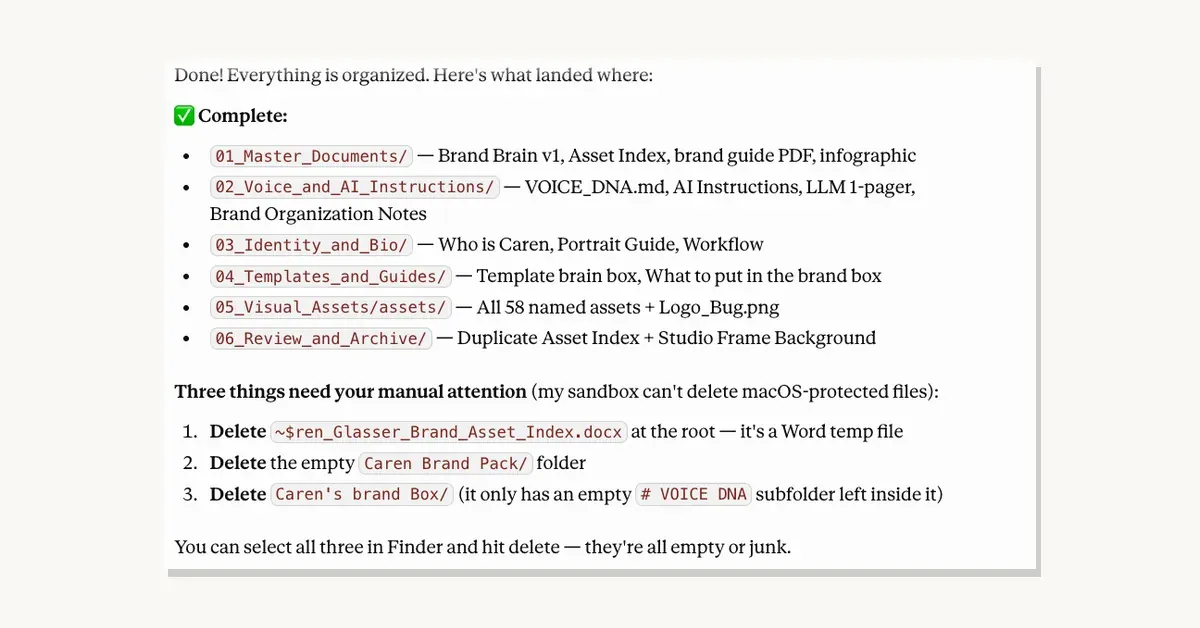
Ten minutes to go from chaos — 62 files scattered across overlapping folders with inconsistent naming, mystery files, and duplicates I didn’t even know existed — to this:
01_Master_Documents — Brand Brain v1, Asset Index, brand guide PDF, infographic
02_Voice_and_AI_Instructions — VOICE DNA, AI Instructions, LLM 1-pager, Brand Organization Notes
03_Identity_and_Bio — Who is Caren, Portrait Guide, Workflow
04_Templates_and_Guides — Template brain box, What to put in the brand box
05_Visual_Assets — All 58 named assets + Logo Bug
06_Review_and_Archive — Duplicates and files flagged for my review
Six numbered folders. Everything named consistently. Everything where it belongs.
Here’s what I want to tell you about how it actually happened — because this is the part that surprised me most.
Cowork didn’t just barrel in and start moving things. It read the files first. It actually looked inside them to understand what they were before it proposed a single folder. Then it came back with a complete organization plan and said: no changes will be made until you approve.
It found duplicates I didn’t know were there. It flagged a Word temporary lock file I’d never have spotted on my own. It asked me two questions about files it genuinely couldn’t identify before proceeding. And when it was done, it gave me a clean completion summary plus three small things it couldn’t do because of macOS protections — and told me exactly what they were and how to handle them myself.
The whole thing felt less like handing a task to a machine and more like working with someone who was genuinely paying attention.
And here’s the moment that got me.
When I looked at that folder afterward — clean, numbered, logical — I felt something I didn’t expect. Not just relief. Something closer to clarity. Like a low-level noise I’d been living with for so long I’d stopped hearing it had finally gone quiet.
I’ve been carrying the weight of that folder chaos around for months. And it dissolved in ten minutes.
I’m going to do more. One folder at a time.
That’s the whole lesson right there — and it’s the same one I’ve been building toward all week. The pain of not doing it was never really about the task. It was about the story I was telling myself about how big and hard and disruptive the task would be.
The task was ten minutes. The story I was telling myself was months.
If you’ve been carrying something like that — a folder, a system, a tool you’ve been meaning to try — I want you to pick just one. Not the whole project. One folder. One session. Set a timer for fifteen minutes and see what happens.
I’ll be here when you report back.
What’s the folder you’re going to tackle first? Tell me below.
Every Thursday I send out The Smart Stack Newsletter — practical, honest, no-hype AI insights for women entrepreneurs who are ready to think first and act smart. Sign up here and join us: https://carenglasser.com/#contact
Keep reading
More on tools & how-to.